This One Idea Changed the Way I Organized My Notes Forever
2026-01-03 — read on Medium

Photo by Tony Sebastian on Unsplash
Over the last year or so, I’ve been sorting my notes in a super simple way.
It’s simultaneously obvious but also counter-intuitive. It’s simple enough for almost anyone to use, yet extensible enough to satisfy the digital world-builders amongst us.
I call the method Notable Folders. It’s a universal principle anyone can apply, regardless of tools. Later, I’ll share ALPPS, my personal extension that layers on task and time management, for those who want to go deeper. But the core idea stands on its own.
Spoiler alert: it involves organizing around people instead of projects. And a fictional wizard helped me figure this out. More on that later. 🪄
People Over Projects
Before I show you how this works, let me share the insight that changed the way I think about organizing notes.
Years ago, I really bought into the idea that smarter search would save me from having to (over-)organize all the information I collected. But my searches kept failing. I’d waste minutes hunting for notes I knew I’d written. And somewhere deep inside, I wanted more order.
So I attempted to add some order with a directory here, a (back)link there, and top it all off with some AI smarts. But I found I was still fidgety about the whole situation.
What I realized was that all the hype about note-taking apps kinda misses the point. It’s not about finding things faster. Critically, it’s not even about what you accomplish.
It’s about feeling fulfilled and content. Your notes should help you, the actual human using them, stay sane in a world that keeps throwing information at you.
Then I came across an idea that completely changed my perspective. A famous philosopher named Immanuel Kant introduced a pretty convincing ‘formula for humanity’: it’s unethical to treat people, more generally conscious beings, as means to an end, rather than ends in themselves.

Yes, I’m citing a philosopher in an article about where to put your grocery lists, but stay with me.
My realization was that all of these note-taking systems tend to emphasize goals and projects as ends in and of themselves. If you organize for actionability, projects are the central figure. And in all of these cases, the people are lost.
We tend to have a bias where we neglect the people and the stories that define our projects and the spaces that we occupy. We spend a lot of time categorizing the work we do in topics and in projects, and while we may remember in our minds the people behind those stories, the representation of that in our notes is lost. And perhaps that ends up leading us to focus on the wrong things, to make the projects that we work on the ends in themselves.
The philosophy behind Notable Folders is people over projects. Whenever you’re organizing your notes, you’re not only thinking about your projects but, perhaps even more so, thinking about who is involved. And that defines how you organize things.
I realized I didn’t need less structure or more structure. I needed the right kind of structure: just enough to work with my brain instead of against it.
Three Examples of the Problem
Allow me to illustrate how simple note-taking and organization can quickly become complicated and how we can simplify the situation.
The Command Line Snippets
Like many requests I receive in my job as a software engineer, I got asked a few months ago to perform a fix and do maintenance work on a part of the product I don’t touch very often.
Working with a colleague, I solved the problem with a few simple incantations on the command line.
I knew these might be useful later, so after I saved them to an inbox using my quick capture method, I faced a decision: where do I ultimately keep these snippets?
There was no obvious one good place to put them. They weren’t generic enough for a general snippets note. If I just kept my quick note for them, I might never find it again.
I could create a folder or note specific to this part of the product and name it accordingly. In the end, that might be the right move, but at the time it felt premature.
To make matters worse, I knew in my deepest of hearts that despite all the search capabilities and tools out there, I still occasionally couldn’t find my useful command line snippets when I needed them.
The Car Charger
A couple of months ago I was having a brief conversation with my wife in the middle of a hectic day with the kids. She brought up whether we should get a new car charger for our electric car or figure out if there’s an adapter that works for it.
It wasn’t super urgent since she already had a way to charge her car. But something about this conversation resonated with me.
Like when I worked with my collaborator on finding the command line trick, I knew something about this conversation was worth noting down. I faced the same problem: where do I put this?
Beyond a simple quick capture place, I wasn’t ready to call this its own project. It might not even deserve to be a project in the first place. And it wasn’t even obvious that I should be responsible for this task.
I felt like I was left with a sort of generic note with no obvious follow-up action, which kinda feels like just collecting trash.
The Bookstore
Finally, I was recently hanging out with one of my daughters at the bookstore. We browsed through different books in the kids section, and at some point, a couple of books clicked. The way I read them to her and the way she enjoyed them resonated with me.
I didn’t really need or particularly want to get the books now. Moreover, we purposely avoid buying things on a whim in front of the kids to demonstrate the value of restraint and delayed gratification. But I wanted to take note of it.
Maybe it was a useful gift idea? Maybe we’d get the books another time? No hard decision had been made. All I knew was that in this moment, this idea resonated and it was worth capturing.
So beyond just putting it in a note that might be hard to search, I brainstormed: couldn’t I put it in a note or a list of gift ideas? Maybe the next step was talking to my wife about whether we should get the book?
Again, this simple thing I wanted to capture left me feeling like I had too many choices for organizing it.
Notable Folders
You probably know where I’m going with this.
In the first example, I could put this command line snippet in its own note associated with my collaborator. Based on my recent interactions with him, he was becoming quickly notable in my world of software craftsmanship.
In the second example, I could put the note about the car charger in a category of notes associated with my wife.
In the third example, I could place these books and a quick note about what resonated between me and my daughter in a note associated with my daughter.
Let’s pause for a second. In those examples, would you have intuitively thought to place these notes in a broader ‘people note’ of sorts? ‘Past me’ would have tried to categorize by some other topic or give up and submit myself to the gods of search and AI.
The theme running through all of these examples is that the note resonated and were all ultimately useful, but there was no obviously good place to keep them in the moment. I now know that associating notes with people is the best way.
What is a Notable Folder?
I don’t know about you, but I feel my best ‘notes’ are in the conversations between me and others. I find myself frequently going back to a chat with someone or an email thread where I remember discussing something.
Taking it further, sometimes I think messaging apps have become our best informal knowledge bases, in and out of the workplace. I find a good way to find important information is through messages I’ve sent to other people as those tend to be memorable.
I frequently hop into the sent section of my email or my sent messages in Slack and find what I need that way. Moreover, looking at sent messages is also a great way for me to pick up where I left off on a project.
The idea behind Notable Folders is straightforward: whenever you come across a piece of information that resonates, and there’s no obvious place to put it already (eg. a project or topic of interest), take a second and consider with intent: who do I associate this information most with?
If this person is important in my life, or is quickly becoming notable, I’ll just create a folder for that person and start placing notes in it.
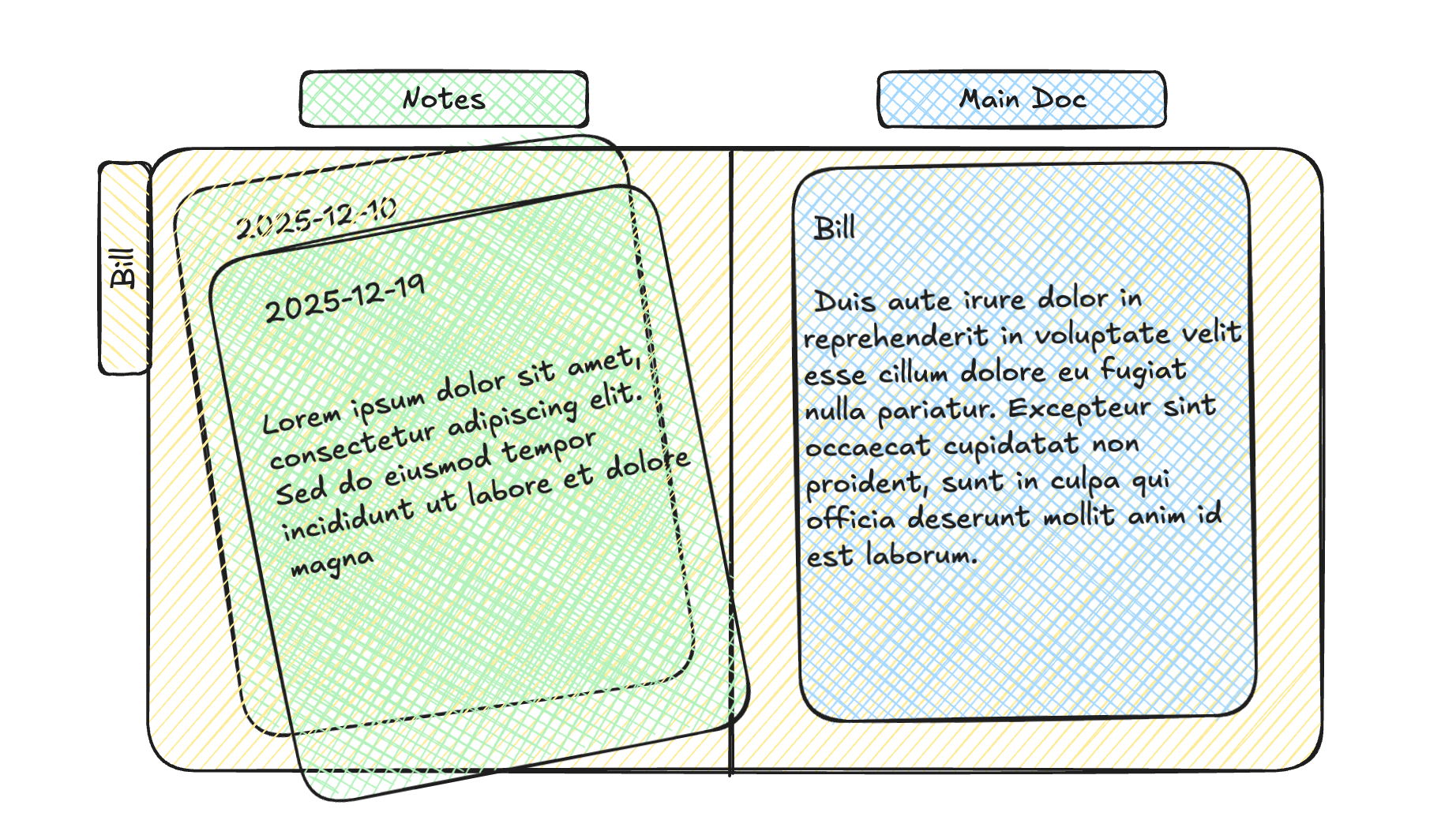
There are two key types of documents in a notable folder:
Log of notes. If something clicks with you, place items in their rawest form in this folder. Videos, photos, screenshots of chat transcripts, meeting notes, command line snippets like I described above, or just ideas. The point is you quickly jot it down in whatever quick capture method you use, and when you’re processing that inbox, you sort it by default into this person’s folder if you don’t have an obviously better place for it. I call this a log because all of these notes are captured at some point in time and form the basis of a story you will be putting together.
Main document. A clean, representative document that captures the essence of all the notes and supplementary documents in the folder. It’s the first place you visualize when you think about a notable folder. It’s your go-to document for anything related to a person of your interest.
That’s it. If you stop reading here, and organize with this people-first philosophy, I will bet that it will be game-changing.
Why Folders?
Why not just use backlinks or tags? You certainly can. But there’s something almost primal about a container. A folder is like a box. You toss things into it. You can picture it in your mind. This is how our brains have worked since we started putting acorns in baskets.
Folders are also universal. They work across every app, every operating system, every tool. When you want to feed notes into an AI or migrate to a new app five years from now, a folder full of files just works. Even if you love backlinks, you’ll want to organize/group links together in a way that often resembles folders.
The Three Examples Revisited
Here’s how the examples above actually played out using Notable Folders. (Fair warning: it’s almost anticlimactically simple.)
The Command Line Snippets
For the command line snippets, the default place where these would go is first into a simple plain text file. You can think of it as a scratch pad that I clear out or process on an approximately daily basis.
Then, upon a brief moment of intentionality, a pause between the stimulus of this whole event that resonated with me and the response, I note that this collaborator is someone I’ve been working with for a while. This collaborator deserves his own space. So I place a note of command line snippets in the folder for that collaborator.
Later, with my collaborator, I added more notes relating to general architecture of the system and other handy incantations. When I want to find something we discussed, I don’t search broadly. I just open his folder and find what I need.
The Car Charger
For the car charger example, I quickly created a note during the time it resonated with me and jotted down a few quick thoughts about it. Like, do we need a new charger at all? I suspect an adapter will work.
In this case, it subsequently took maybe 5 to 10 minutes of research to realize that an adapter was useful. So once that got solved, it never became its own full project. However, when I was finding the right adapter I placed the candidates into a folder that represents my wife.
This is an important clarification. Here’s something I did. It’s not associated with a big project, but it got completed at its own natural pace. And it’s not associated with its own space other than the person it was associated with. And the key point is that’s okay.
The next time this comes up a year later, two years later, and I’m thinking, where did I find this charger? The easiest thing to do is recall: “I was working on this charger situation with my wife, and it was around this time.” I just quickly scan my notes around that time (or search within a folder). I’ve found that this tends to be a more reliable approach than a global search.
The Bookstore
For the final example, whenever I find a book or some product of interest, I’ll take a quick photo of it. Then using my iPhone share sheet, I’ll click on an option that saves a copy of that image into a directory. I subsequently put that file in the folder that corresponds to my daughter.
No elaborate tagging system. No agonizing over categories. Just: “This moment was about my daughter, so it goes in her folder.” Done.
Going Deeper: ALPPS
The nice thing about Notable Folders: it’s amenable to a lot of customization, adding the kind of color you might like to make your digital space feel like a real home. A place you’re happy to tidy up every evening and every week like you may do for your real home.
What follows is my personal extension of this method — ALPP S — which also addresses task and time management. Because those two topics are so intertwined with note-taking, I thought I would detail it here. My hope is that something in it, however minor, inspires you to tweak your workflow to be more satisfying and effective.
ALPS originally stood for four categories: Archives, Logs, Projects, and Spaces. In practice, I’ve come to call my active system ALPPS: Archives, Log, People, Projects, and Spaces, because the people dimension deserves its own first-class spot alongside projects.
Active Logs, People, Projects, and Spaces
In my system, I have four types of “active” bins:
Log (hours to days): A catchall bin for any note I take in the moment that’s not obviously or easily categorized. These represent my thoughts, my raw thoughts and play at any given time. Most things here will be left to the annals of history, but many items might easily fit in a current or future project or space.
The purpose of the log is to always make sure I have a place to capture valuable thoughts on the scale of hours to days before they slip away. They can always be categorized later.
For example, I don’t journal reflective/emotional thoughts in a physical or digital notebook. Rather, I capture voice memos almost daily. With the help of transcription and AI tools to clean them up, those journal entries often fall into my log. There are times when they tend to be more focused on projects or people and then I can place them in those notable folders.
Projects (weeks to months): Larger, memorable efforts that usually have well-defined deliverables or a clear idea of what the end or end date might look like. Examples could be a kitchen remodel, vacation, quarterly deliverable at work. I’m generally careful about what I call a project. At any given time, I only have a handful of actual projects.
In my opinion, a well organized mind is primed for engagement and people and projects are the primary ways I engage with the world daily. For both notable people and projects, I am always most engaged if there is a next action to move things forward.
People & Spaces (years): This is where Notable Folders lives. People and Spaces are contexts associated with a person or an area of interest. The bar to become a space is relatively high. By default, you should place things in folders associated with people until you feel like a topic has graduated enough to become its own space.
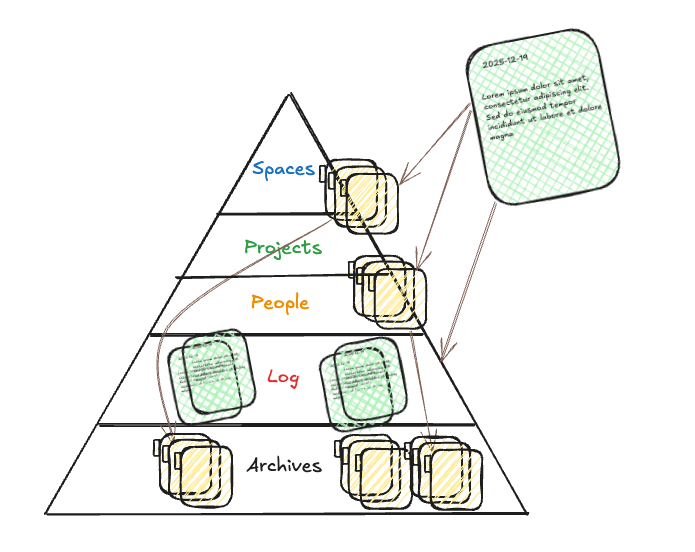
You can imagine them in a sort of pyramid or ‘mountain’ where the log is at the bottom. Generally, this is the default place where you collect most items. Above that are notable people, projects (work with defined endpoints), and at the top are spaces: topics and contexts of interest.
When organizing for actionability, I counter-intuitively prefer People over Projects. In any given season of my life there are only a handful of projects I’m actively working on and it’s usually pretty obvious if a note fits neatly in one of them. What’s less obvious with any given incoming note is what person is it most actionable for?
I find this to be way more practical as many topics and tasks don’t neatly fit into a big project or space you are cultivating. Rather, they are best suited for your next conversation with a person. People gets its own top-level folder in ALPPS rather than being nested only within Spaces.
Special Space: Lists. There are a number of very active lists that don’t fit neatly into a project or a space. I have found it particularly useful to simply keep all of these lists in one folder called ‘Lists’. Examples include:
- Groceries
- Books to read
- Shows to watch
- This week
- …
I have always found that what works best for me is to treat tasks as calendar events. In ALPS, calendar events are simply notes. I can simply turn a list item into a note with a future date and it becomes a scheduled task. You will see below that it is easy to store all of this in plain text and visualize it beautifully in Obsidian.
Archives: Where Notable Folders Find Their Permanent Home
As time progresses, you’re going to accumulate more and more notable folders, and the human mind desires some way to organize them. This is where Archives comes in.

Photo by Loris Boulinguez on Unsplash. The Long Room in Trinity College Ireland: Inspiration for the Jedi Archives
I like to think of Archives more like the ‘Jedi Archives’ in Star Wars. (Yes, I’m now teasing both a potential wizard and citing a galaxy far, far away.) It’s full of valuable content that represents the most useful documents and my favorite work. It’s not just meant to simply be cold storage I’ll never revisit. It’s a place that I actually enjoy browsing.
Analogy: think of a bookstore. When you walk in, there are tables out front with recently released books roughly grouped by category. These are meant for browsing. They’re active. That’s your Logs, People, Projects, and Spaces.
But the not-so-prominent shelves: places you still browse, places you still want to reference quickly: that’s the Archives. The idea, just like in a bookstore, is that you want to know by heart where the key sections are.
Interestingly, even in a world full of AI and advanced searching, I’ve found that I still want a reasonable structure for my own information. I think this fundamentally has to do with the way our brains work. We tend to be very spatially oriented creatures. We remember if we put something somewhere.

Photo: My local bookstore with tables out in front
My Archives Structure: Johnny Decimal
You can organize your Archives however you like, but I use the Johnny Decimal (JD) system. The beauty of Johnny Decimal is that it takes advantage of the part of our memory that associates things with specific locations.
In JD, you have a fixed number of shelves (at most 10 broad areas of your life), and within each shelf, at most 10 boxes. Each folder gets a specific ID. This constraint is counterintuitively freeing. It works surprisingly well with our memory because it introduces a relatively well-balanced hierarchy.
In my Notable Folders implementation, the first box in each shelf is dedicated to notable people in that area, and the second box to a library of notable books, movies, podcasts and articles. (Notable = content I have taken significant notes on).
For example, here are how a few shelves and boxes could look in my own Archives (I will describe more details on my approach in a separate smaller article):
10-19 Life admin
   ...
40-49 Self-care
   41 Selfish people
   42 Selfish library
50-59 Spirituality
   51 Spiritual people
   52 Spiritual library
60-69 Software craftsmanship
   61 Software people
   62 Software library
So my Notable Folder for Bill, when not actively in use, is tucked away here:
60-69 Software craftsmanship/
   61 Software people/
      61.14 Bill/
   62 Software library/
      ...
Reasonable Person: Wait, your notable folder which probably is better titled ‘Bill/’ is now ‘61.14 Bill/’?Me: Yes.
The numbering system helps you remember it. There’s no perfect organization system, but JD forces you to pick something and stick with it. In the last few months, if I have been unsure about whether a notable folder deserves an ID, I either figuratively trash it or let it simmer in the active directory until I’m sure it should be kept around.
This creates a natural flow: Notable Folders live in your active directories while you’re engaging with those people, then graduate to Archives with a permanent address when the relationship stabilizes or project information is deemed notable enough to keep.
Implementation in Obsidian
I’ll now get into my implementation in Obsidian. Again, I emphasize that you can imagine creating this kind of notable folder structure using any tool of your choice. I am simply illustrating the power of Obsidian to be a very pretty and useful overlay on an otherwise very intelligible, portable, and operationally usable file structure.
Let’s re-visit the command line snippet example. Here is how my workflow looked for that afternoon.
I visited that person’s desk with my laptop. As we were solving the problem and I realized a few of the commands we used could be useful later, I just used my quick capture method to append lines of text to the plain text file that I call ‘Inbox’. That file looked something like this made-up example:
- Bill
- Handy commands for fixing product feature X
  fc -l | grep "$(date +%Y-%m-%d)"
  du -sh ./* | sort -h
After I packed up my laptop and was heading out, I also did some quick research on toilet seats and noted down a task I needed to perform, so I used a Siri Shortcut on my phone triggered by my iPhone’s action button to quickly add text input. The file now looked like this:
- Bill
- Handy commands for fixing product feature X
  fc -l | grep "$(date +%Y-%m-%d)"
  du -sh ./* | sort -h
- Toilet seat measurements: ...
- Options at home depot: ...
- Update 401k contributions
- Milk
As I was waiting for the train to arrive, I pulled out my phone again and loaded this file in Obsidian. I could just process it in plain text like above, but Obsidian can also render that exact file into a beautiful interactive Kanban board.
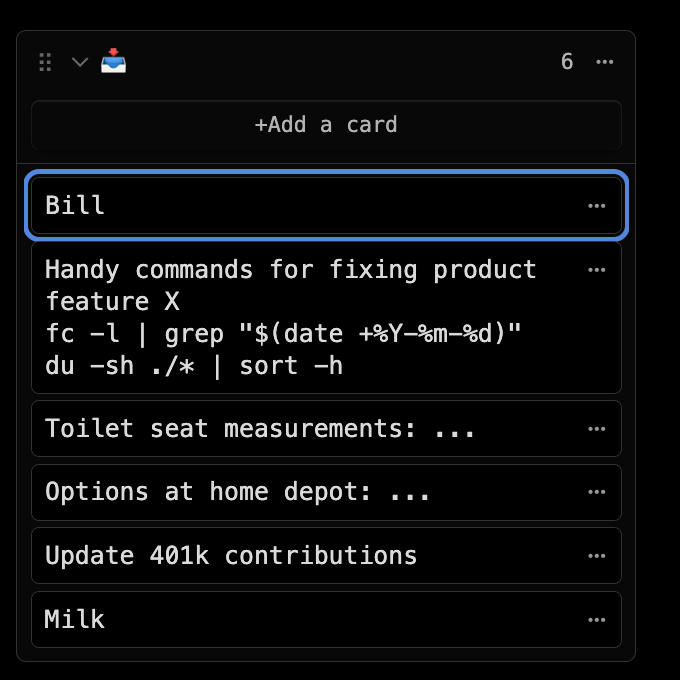
(Space) For the notes relating to Bill, I realized I didn’t have a note dedicated to Bill yet, so I tapped just a couple of times to create a new note for this card.
In Obsidian, it’s trivial with another few taps to instantly turn this ‘Bill’ note into a folder using the ‘Folder Notes’ plugin and associate that folder with a calendar using the ‘Full Calendar’ plugin.
I then tapped twice on the card with the command line snippet and instantly copied them to a note in the ‘Bill’ folder. You can think of the Bill folder as a sort of ‘Space’ or context where you keep a main document and notes associated with Bill.
(Project) As I went through the next cards in the Inbox, I was similarly able to quickly copy over the toilet seat-related cards to my ‘Replace Toilet Seat’ project folder.
(Log) Next, I quickly copied the ‘Update 401k contributions’ card to a calendar I call “Log” and drag and drop it to a time today where I’ll likely be able to get to it.
I then moved the card associated with ‘Milk’ to my ‘Errands’ list and was done processing my Inbox.
What’s fun about Obsidian is that the ‘Bill’ folder structure is perfectly useful in and of itself, but with the ‘Notebook Navigator’ and ‘Full Calendar’ plugins, I can visualize it with the main document associated with this person, a list of relevant notes and images in the folder, and when I took the notes on a calendar.
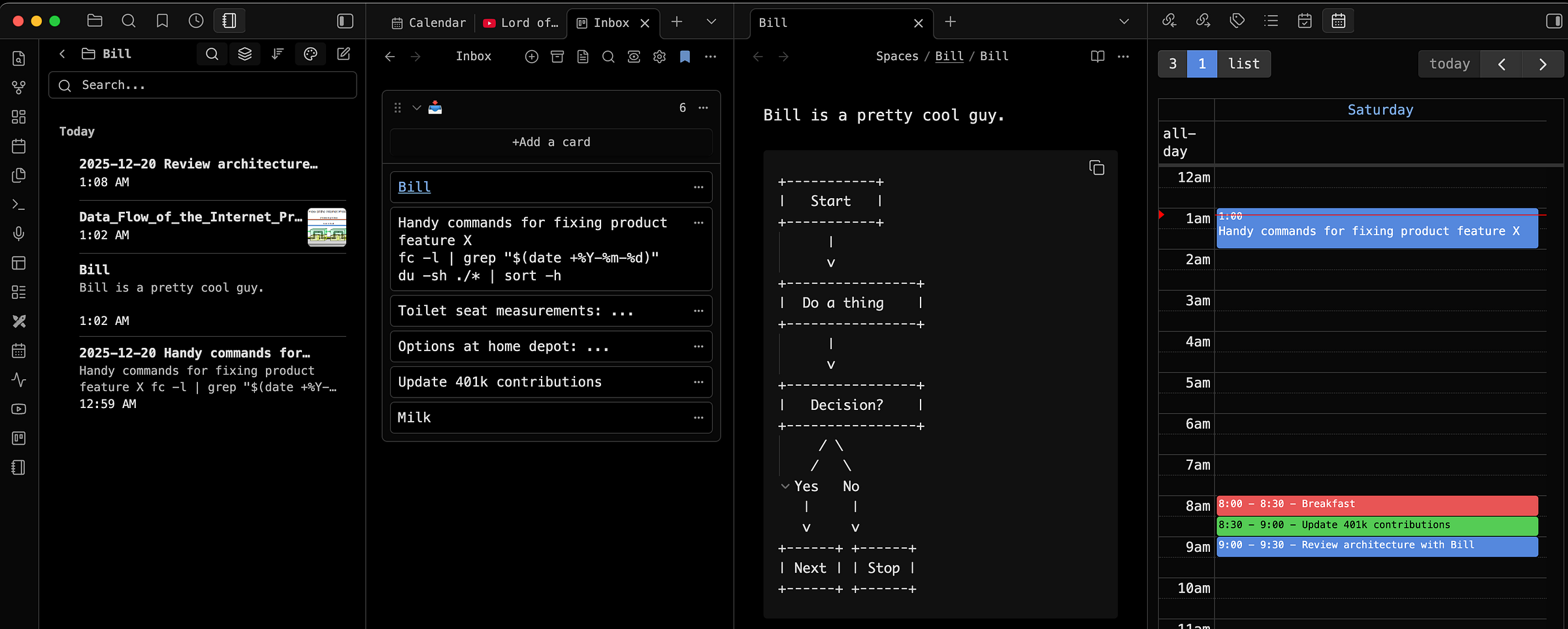
Obsidian Screenshot. Left to right: ‘Notebook Navigator’ plugin folder view for Bill, inbox list of note, main document for Bill, note with command line snippets shown on calendar.
What is particularly awesome about Obsidian and the integration with the Full Calendar plugin is that any future notes I have for Bill or any other notable folder can be treated like intended tasks to perform on my ‘frontier’ of possible events. I typically color calendar events by Project (green), Log (red), or Space (blue).
A Well-Organized Mind
The organization of your notes is a reflection of the organization of your mind, not the other way around.
This might sound ridiculous, but hear me out: my approach this type of organization was partly inspired by a fictional wizard’s thoughts on death.
Yes, you read that correctly. Albus Dumbledore, the same guy who defeated dark wizards and ran a school for magic, apparently had some insights about file management.
For some reason, his famous line, “To a well-organized mind, death is but the next great adventure,” kept rattling around in my head every time I stared at my digital mess.
You’re thinking: “This person is now also about to connect mortality to where I put my grocery lists.” And you’re absolutely right. But stay with me, because somewhere between Dumbledore’s profound wisdom about life’s impermanence and my very mundane frustration with finding old meeting notes, I had a realization.
Projects die. That brilliant idea you had six months ago? Dead. The detailed research you did for something that never happened? Also dead. But the people involved in those projects? They’re still here, many of them still collaborating with you, a part of new adventures.
(And yes, it’s not lost on me that people also die, relationships end, and even my beloved Notable Folders system will probably seem quaint in twenty years. But compared to the lifespan of my random project ideas, people are practically immortal.)
So yes, I’m essentially arguing that the secret to digital organization came to me via a children’s book character discussing the afterlife. But if you can get past the absurdity of that premise, you might find it actually makes perfect sense.
When you organize around people instead of projects, you’re organizing around what endures. You’re building a system that acknowledges how life actually works: relationships persist through multiple project lifecycles, conversations spark new adventures, and the people who matter keep showing up in different contexts.
That’s what a well-organized mind looks like to me. Not rigid categories or perfect taxonomies, but a structure flexible enough to embrace the ongoing adventure of being alive. Of knowing that when one chapter ends, the next one begins perhaps even with a similar cast of characters. 🏔️
Notable People
In the spirit of this article, I want to end by acknowledging the notable people whose ideas shaped my thinking. Each deserves their own folder in my system and has a book or two I’ve gone to again and again.
**David Allen.**The godfather of modern productivity. His Getting Things Done introduced the world to “mind like water” : the idea that you can only think clearly when you’ve captured everything externally into a trusted system. His emphasis on full capture, contexts, and the critical importance of defining next actions for projects fundamentally shaped how I think about engagement and moving work forward.
Cal Newport. Author of Deep Work and creator of the Time-Block Planner. Newport’s insight that we should emphasize calendars over task lists (planning when we’ll do things rather than just what we’ll do) gave me further confidence in my approach to logs and events in my future or ‘frontier'. His multiscale planning concept (daily, monthly, yearly) provides the temporal scaffolding for how I think about time in ALPS.
**Tiago Forte.**His brilliant book Building a Second Brain introduced me to the power of containers and organizing for actionability through the PARA system (Projects, Areas, Resources, Archives). He also introduced me to choreographer Twyla Tharp’s concept of “project boxes” from her book *The Creative Habit.*She literally kept physical containers for collecting everything related to a creative project. This deeply influenced my thinking about folders worth noting.
**Ryder Carroll.**Author and creator of The Bullet Journal Method. His emphasis on intentionality (planning your time and writing notes with purpose rather than just collecting) helped me understand that the act of organizing is itself a form of reflection. The practice of migration (regularly reviewing what’s worth keeping) directly influenced how I think about graduating notes from logs to spaces.
Mark Manson. His book Everything is Fcked* and subsequent content dares to view time managementthrough a philosophical lens. He introduces Kant’s formula for humanity in an accessible way. It is the philosophical foundation of the “people over projects” insight. (Also, I highly recommend the recently released book on Kant, called Kant.)
Carl Pullein. Author of Your Time, Your Way and creator of the Time Sector System. His advice to be careful about what you call a project and limiting yourself to a handful at any given time has always resonated with me. His practice of always keeping a primary ‘project note’ inspired the ‘main document’ in Notable Folders.
**Johnny Decimal.**Creator of the Johnny.Decimal system documented in The Johnny.Decimal Workbook. The elegance of using a fixed hierarchy (at most 10 areas, at most 10 categories per area) with memorable numeric IDs gave me the structure I needed for my Archives. His system takes advantage of our spatial memory in a way that finally made long-term organization feel natural. (Tip of the hat to Ellane W or first pointing me toward JD!)
Jake Knapp & John Zeratsky. Authors of Make Time: How to Focus on What Matters Every Day. Their concept of choosing a daily highlight: a single 60–90 minute focal point that will make your day feel meaningful directly influenced how I think about intent in my logs. I often create an all-day event that acts like a ‘post-it’ note to remind me of my main focus. What I love most about their approach is its playful practicality: instead of burying you in research and science, they offer over 80 concrete tactics and encourage you to run tiny personal experiments to see what works.
If you’ve enjoyed this article, you might find these previous explorations fun:
- Capture To Do — This article is an evolution of that original system for managing tasks in Obsidian but extends it to note organization.
- Discipline Absorbs Chaos — Introduces the notion of a “frontier” calendar event for time management.
- Have You Been Using Your Calendar All Wrong? — Explores the relationship between lists and calendars.
- Build a Personal Knowledge Encyclopedia — My first introduction to notable people and spaces, and the connection to Wikipedia-style thinking.
- Atlas Journaling — With notable folders, my maps now don’t just involve projects and contexts but also people. I still love to atlas journal every season.
- Introducing the Obsidian Kanban Plus Plugin — A practical plugin to use some of the methods I discuss here.