Tech Habits — Property Folders, Linear Calendar View in Obsidian, & Plain Text Renaissance
Tech Habits: Property Folders, Linear Calendar View in Obsidian, & Plain Text Renaissance
An extended experiment in flattening Johnny Decimal, visualizing projects through time, and why plain text is having a moment.
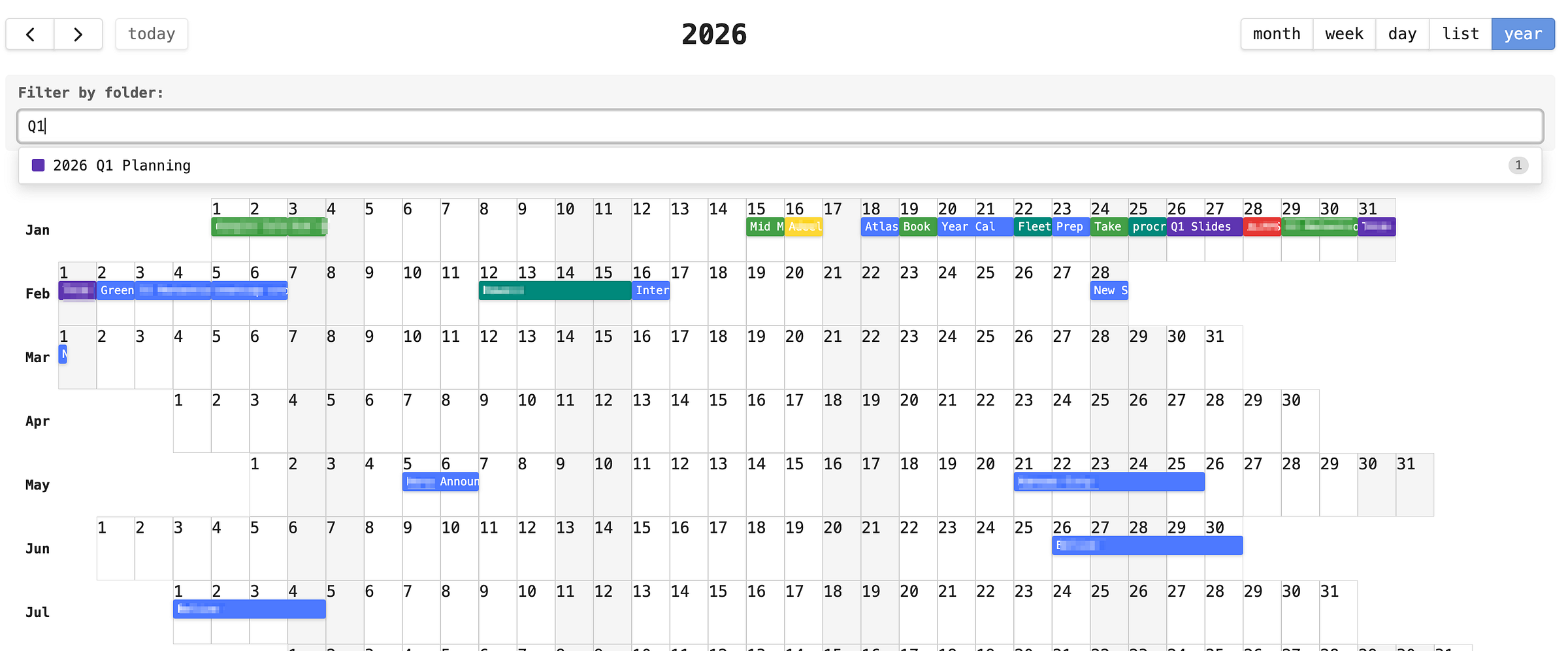 Linear calendar year view in my fork of the Obsidian Full Calendar plugin.
Short Update: A recent installment of Tech Habits called “Can You Johnny Decimal Without the Decimal?” explored removing numerical IDs while keeping the hierarchy. This one goes further.
If you’ve been following these Tech Habits posts, you know I’ve been deep in Johnny Decimal territory. I love the hierarchy. I love the sense of place. I love opening my file explorer and feeling like I’m looking at a map of my own mind.
 Photo by Richard Heinen on Unsplash
But I’ve also been feeling some friction.
Creating a folder for every new person, project, or topic requires an upfront decision. I have to decide where something belongs before I’ve had time to figure out what it even is. And maintaining that folder structure sometimes feels difficult or messy.
https://medium.com/media/0bfb10b684986458be4f6dc8b30f89e6/href
Meanwhile, I kept coming back to Steph Ango’s vault setup. The Obsidian CEO uses very few folders, relying instead on metadata properties and heavy linking. His notes live mostly flat, organized by queryable data rather than physical location. It’s elegant. It’s simple. And it made me wonder: what if the hierarchy I love about Johnny Decimal could live in a system that enjoys the benefits of Steph Ango’s setup?
In one of my previous posts, I was making a fairly passionate case for why folders are primary. “Folders give you place,” I wrote. “A folder is a commitment.” I meant every word of it.
And now I’m running a tiny experiment that strips away those ‘physical’ folders almost entirely but keeps a hierarchical index. What if I keep everything that makes Johnny Decimal valuable, the hierarchy, the constraints, the sense of “this belongs here”, but store it entirely in YAML metadata instead of in physical folders? Do I gain the efficiencies I want while retaining a sense of place? What do I lose?
I’m calling folders from this line of ‘flattened Johnny Decimal’ thinking Property Folders. To be clear, this experiment is meant to be extreme. I’ll likely converge on a setup that has some reasonable set of ‘real’ folders.
Property Folders
A Property Folder is simple. Instead of nesting a file inside 60-69 Craft/61 Craft people/61.10 Bill Bob/, you have a flat file called Bill Bob.md with a box property in its YAML front matter that points to aCraft people 'box' . A box corresponds to a category in Johnny Decimal. I like to use his shelf, box, folder terminology over his ‘AC.ID’ terminology. If you have other files that relate to Bill Bob (eg. quick notes in your log), you simply assign folder to be Bill Bob. The hierarchy still exists. The categories still exist. The constraint of "Bill belongs to Craft people" is still encoded. But the file itself sits flat, and the structure lives in metadata.
This buys me:
Reduced friction in capture mode. When I’m walking my dog and voice-capturing a thought, I don’t want to decide which nested folder it belongs in. I want to create a note, optionally associate it with a (potentially new) folder property, and move on. The categorization happens, but it doesn’t interrupt the flow. I don’t need to think about creating a folder, etc.
Powerful filtering through Obsidian. With Bases, I can query all notes where folder equals Bill Bob and get the same view I'd get by opening a physical folder. It's also easy to do this using backlinks, simple text queries and filters using other tools.
This is how I sometimes think about it. Imagine you’ve been busy collecting notes all over the place about Bill Bob and things have been so hectic you never got around to actually stepping back and doing something meaningful with these notes. Now imagine having an assistant who, when you desire, automatically pulls everything related to a person from piles on your desk and populates your shoe box for you so you can begin higher level work. You don’t have to make the box right away. The links accumulate, and when you’re ready to formalize something, everything is already collected for you.
I Lose:
Some form of portability across apps. This is the real tradeoff, and I want to be clear about it. Physical folders work everywhere. Every operating system, every app, every file manager understands Craft/Craft people/Bill Bob/. Property Folders only weild their most powerful magic in tools that can query YAML. If I'm in Finder or VS Code or my phone's file browser, I lose that ‘traditional’ file structure but can use text search to find groups of relevant items.
The spatial feeling of place? There’s something about clicking through nested directories that feels like walking through rooms in a house. Property Folders trade that spatial experience for a more fluid, query-based one. It’s powerful, but it’s different.
This is why I’m calling it an extreme experiment. I’m testing the boundaries. How much of the folder experience can metadata replicate? And at what point do the tradeoffs become unacceptable? I genuinely don’t know yet.
In true Johnny Decimal spirit, I rely completely on my Archives.md to represent the hierarchy in a collapsable bulleted list. This works well for a feeling of place. But admittedly, by flattening the Johnny Decimal folder structure in this way, I lose the browsability most file managers and in-app file browsers provide.
The Calendar as Unifying Principle
A big motivation for exploring Property Folders was that the calendar could potentially become one of the most powerful views in my entire system.
The insight is deceptively simple. If many notes already have a date in their YAML front matter (and in my system, they do), then every note is already a calendar event. When you have both startDate and endDate properties in your project note, suddenly projects have duration. They're not just files sitting in folders; they're spans of time you can see on a timeline.
I recently forked the Full Calendar plugin for Obsidian and added a few features: filtering events by any property, coloring them by category, and most importantly, a brand new year view that lets me see all my projects as horizontal bars across time. This view is based on the linear view recently championed by Nick Milo and is spiritually inspired by an implementation of it compatible with Google Calendar.
https://medium.com/media/5ed2ad73e99e4849cda5629c751922fa/href
The result is that projects exist as calendars on the calendar. Not as separate calendars you toggle on and off, but as events you can filter by property. “Show me everything related to Project X” gives me a focused view. “Show me everything” gives me the full landscape. And because the properties are the same ones used by Property Folders, the calendar and the organizational structure are the same system.
Johnny Decimal gives me categorical structure: this belongs to Craft, this belongs to Self-care. The calendar gives me temporal structure: this started in January and runs through March. Together, they’re complementary. The calendar shows me when things are happening. The Johnny Decimal hierarchy shows me where things belong. It’s a trusted place I can call home. And Property Folders are the mechanism that lets both views work on the same underlying data.
I imagine Obsidian Bases may get a calendar view at some point much like Notion has with its databases and this would be great.
From Sandbox to Graduated
One concept that fell naturally out of this setup is something I’m borrowing from the Cloud Native Computing Foundation: maturity levels.
CNCF categorizes open source projects as Sandbox, Incubating, or Graduated based on how mature and production-ready they are. I’ve started applying the same framework to my notes and projects.
Sandbox means experimental. I’m playing around with a primordial form of a notable folder. It might go somewhere, it might not. A voice memo on a person or topic captured on a walk, a half-formed thought on a topic, etc. These are like piles of paper on a creatively messy desk.
Incubating means it has a Property Folder, maybe a Main Document started, but it’s not something I’d want to reference years from now. It’s taking shape but hasn’t solidified.
Graduated means this is a self-contained, referenceable artifact. It tells a coherent story. It has links to key working documents and weather resistant outputs. If I came back to it in five years, I’d get real value from it. This is the Wikipedia-style article, the evergreen Main Document that stands on its own.
The beauty of this framework is that it explicitly acknowledges the liminal space. Most productivity systems want you to decide immediately: is this a project? A note? A task? The maturity model says: it can start as a pile of sand and graduate into something meaningful over time.
In practice, the calendar makes this visible. Sandbox items are brief blips. Incubating projects are short spans. Graduated work repeates across months and has a visible presence in the year view. The maturity of an idea becomes something you can literally see.
The Plain Text Renaissance
I want to zoom out for a moment, because I think what I’m experiencing isn’t just a personal workflow evolution. Something bigger is happening.
Plain text may be having a new renaissance post Obsidian-like apps.
When I started this Tech Habits series, using Markdown files as your primary organizational system was squarely nerd territory. You needed to be comfortable with things like Obsidian, YAML, syncing, plugins and may want to dabble in version control, and the command line. The pitch was always “it’s more portable and future-proof,” which is true but not exactly a mass-market selling point.
What’s changed is apps like Obsidian and AI working very well with plain text setups.
https://medium.com/media/9b6c84030cdca7522059ab208c6590a0/href
In the last year, I’ve watched AI assistants transform what’s possible with plain text. I replaced an old spreadsheet with complicated formulas with a AI-assisted color-coded HTML table in a markdown file last week. It took minutes. The result is more contextual, more flexible, and lives right next to the notes it relates to. I modified the Obsidian Full Calendar plugin to add features I wanted: a year view, property-based filtering and coloring, and it took an evening of “vibe coding” with an AI assistant rather than weeks of learning plugin architecture.
This isn’t just about coding productivity. It’s about the relationship between plain text and rich interfaces. The pattern I’m excited to see emerging is: plain text stays clean and portable underneath, while intelligent tools layer beautiful, powerful interfaces on top.
The Full Calendar plugin renders my simple YAML dates in notes as a visual timeline. Kanban Plus renders my markdown lists as draggable boards. But open the same files in any text editor and they’re still just text. Readable, searchable, future-proof text.
And if you think about it, this is exactly what the ‘big’ AI tools themselves are doing. Codex, Claude Code, the voice capture interfaces like Wispr Flow, the terminal interfaces for most AI coding tools, the Mac apps that present elegant ‘hover above’ windows with plain text queries as the input are all following the same principle: simple plain text data underneath, smart interface on top.
This week alone, multiple AI companies released new tools that reinforce this pattern: eg. Claude Cowork, Codex App. We’re in a renaissance of tool development that simultaneously pushes forward on beautiful interfaces and goes back to basics on the value of plain text and simple data formats. These aren’t in tension. They’re the same movement.
I realize my personal obsession with plain text may be niche. Not everyone wants to write YAML front matter or fork Obsidian plugins. That’s fine.
(Full disclosure, nearly a decade ago, once I realized I could write something like this draft in Vi, Typora, iA Writer, and Obsidian dependent on how I feel, I never looked back. No matter how hard I sometimes try to not tie myself to plain text, I just benefit from it over time too much. As a bonus, I’m writing this draft in Typora now because it just feels great. I get to make that choice.)
However, over time, I’m trying to see whether there are underlying principles that are universal, things like:
Use time as a primary organizing dimension. Calendars aren’t just for meetings. They’re a natural way to see the shape of your work and life. If you can see your projects as spans of time alongside your events and commitments, you get a kind of clarity that folder hierarchies and task lists can’t provide on their own.
Let structure emerge, then formalize it. Don’t force everything into a rigid system upfront. Capture freely, let ideas accumulate, and then decide what deserves a thoughtfully organized permanent home. The sandbox-to-graduated progression works whether you’re using Obsidian or Notion or Apple Notes.
Keep your foundation simple and portable. Whatever system you use, make sure you could walk away from any single tool without losing your data or your organizational logic. Plain text is the extreme version of this, but even within proprietary tools, you can favor simpler structures over complex nested databases.
Treat your system as a series of experiments, not a final answer. I somewhat contradicted my own post from a month ago. That’s part of the process working and since it’s relatively low cost it’s worth it for me to experiment a little for efficiency gain and personal enjoyment. Also, If I’m not occasionally uncomfortable with how my system is evolving, I’m probably not learning.
These principles work in Notion. They work in Apple Notes. They work in a paper notebook (see video below). I just happen to find plain text the most satisfying place to explore them, and the AI-powered tooling moment we’re in is making that exploration more accessible than ever.
I’m continuing to run the flattened Johnny Decimal experiment with Property Folders. So far, the reduced friction in capture mode has been worth the portability tradeoff, but I’m watching closely for where it breaks.
The linear calendar has been genuinely exciting. Seeing my projects as time-spans alongside daily events has changed how I think about what I’m working on and what’s coming next. I’m hopeful that tools like Obsidian will continue to develop more powerful calendar and temporal views natively.
The purist truth-seeker in me is searching for the simplest possible version of all of this. The holy grail isn’t the perfect system. It’s the minimal system that still gives me the clarity and structure I need.
‘Till next time 🏔️